
Integration Point: Design - Multiple Endpoints
Gabriel Potvin
September 17, 2026
IntegrationPointDesign.RmdGo back to the Getting Started: Overview page
Description
The Design integration point allows you to implement custom decision-making logic for Multiple Endpoints designs. You can customize the statistical test for the treatment effect, the multiplicity adjustment method, and the decision rules instead of relying on East Horizon’s parameters. This integration point is similar to the Analysis and Multiplicity Adjustment integration points of other designs. Design functions are called at each analysis look to make decisions about endpoint efficacy, futility and trial continuation based on user-defined criteria.
Availability
Instructions
In East Horizon Explore
You can set up a design function under User Specified Analysis in the Design Tab while creating or editing an Input Set.
Follow these steps (click to expand/collapse):
- Select User Specified-R from the dropdown in the User Specified Analysis field in the Design Tab.
- Browse and select the appropriate R file (
filename.r) from your computer, or use the built-in R Code Assistant to create one. This file should contain function(s) written to perform various tasks to be used throughout your Project. - Choose the appropriate function name. If the expected function is not displaying, then check your R code for errors.
- Set any required user parameters (variables) as needed for your function using + Add Variables.
- Continue creating your project by specifying scenarios for patient Response, Enrollments, etc.
For a visual guide of where to find the option, refer to the screenshot below:
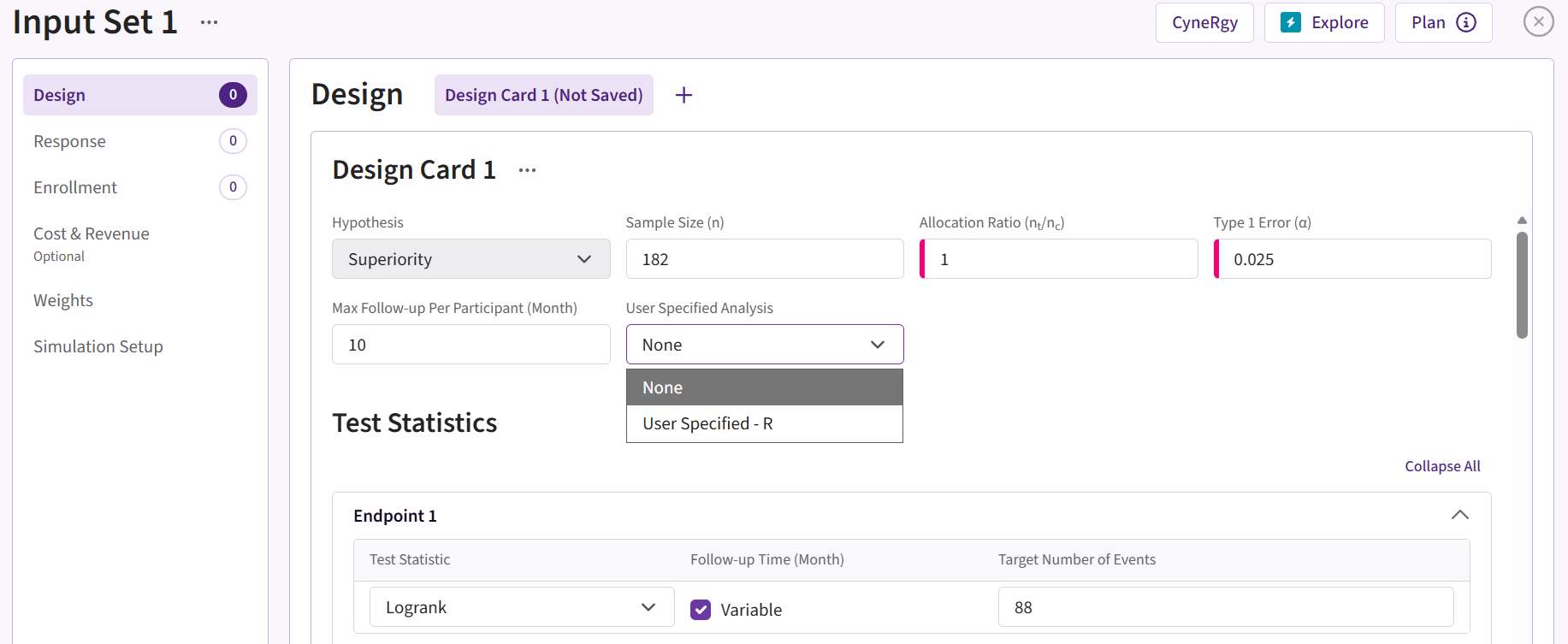
In East Horizon Design
You can set up a design function under User Specified Analysis in the Design Tab while creating or editing an Input Set.
Follow these steps (click to expand/collapse):
- Select User Specified-R from the dropdown in the User Specified Analysis field in the Design Tab.
- Browse and select the appropriate R file (
filename.r) from your computer, or use the built-in R Code Assistant to create one. This file should contain function(s) written to perform various tasks to be used throughout your Project. - Choose the appropriate function name. If the expected function is not displaying, then check your R code for errors.
- Set any required user parameters (variables) as needed for your function using + Add Variables.
- Continue creating your project by specifying scenarios for patient Response, Enrollments, etc.
For a visual guide of where to find the option, refer to the screenshot below:
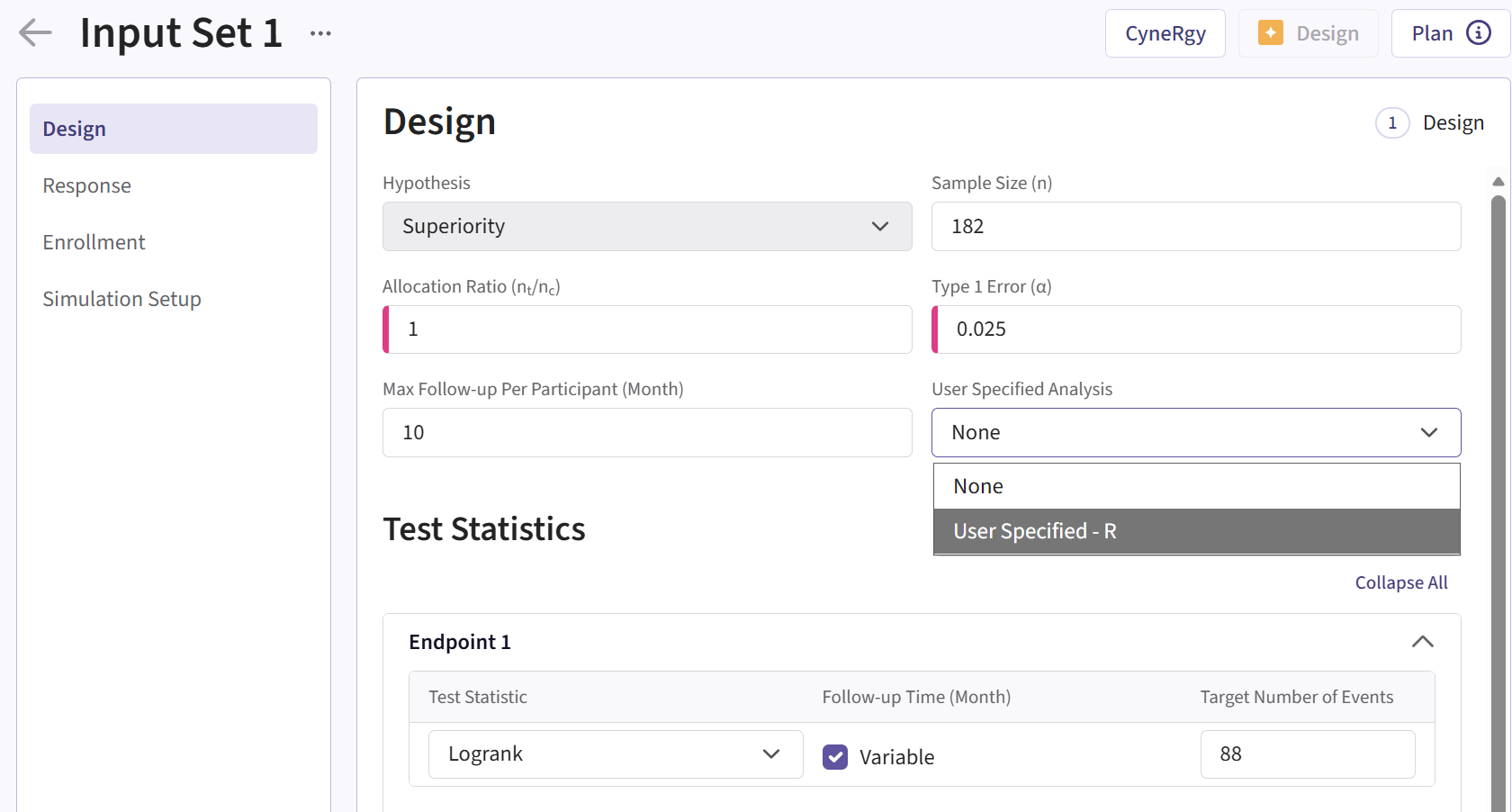
Input Variables
When creating a custom R script, you can optionally use specific
variables provided by East Horizon’s engine itself. These variables are
automatically available and do not need to be set by the user, except
for the UserParam variable. Refer to the table below for
the variables that are available for this integration point, outcome,
and study objective.
| Variable | Type | Description |
|---|---|---|
| SimData | Data Frame | Subject data generated in current simulation, one row per subject.
To access these variables in your R code, use the syntax:
SimData$NameOfTheVariable, replacing
NameOfTheVariable with the appropriate variable name. See
below for more information. |
| AnalysisData | Data Frame | Subset of SimData, containing the patient data
available at the current analysis look. For
Statistical Design = Fixed Sample, contains information for
the single look. To access these variables in your R code, use the
syntax: AnalysisData$NameOfTheVariable, replacing
NameOfTheVariable with the appropriate variable name. See
SimData for more information. |
| DesignParam | List | Input parameters which may be needed to compute test statistics and
perform tests. To access these variables in your R code, use the syntax:
DesignParam$NameOfTheVariable, replacing
NameOfTheVariable with the appropriate variable name. See
below for more information. |
| LookInfo | List | Input parameters related to multiple looks. For
Statistical Design = Fixed Sample, contains information for
the single look. To access these variables in your R code, use the
syntax: LookInfo$NameOfTheVariable, replacing
NameOfTheVariable with the appropriate variable name. See
below for more information. |
| DataSummary | List | Summary statistics for each endpoint. To access these variables in
your R code, use the syntax:
DataSummary[[EPNAME]]$NameOfTheVariable, replacing
NameOfTheVariable with the appropriate variable name and
EPNAME by the endpoint name. See below for more
information. |
| OutList | List | List of outputs that was returned in the previous look. Only
relevant for Statistical Design = Group Sequential. Set to
NULL for the first look. See below in the Output
Variable. |
| UserParam | List | Contains all user-defined parameters specified in the East Horizon
interface (refer to the Instructions
section). To access these parameters in your R code, use the syntax:
UserParam$NameOfTheVariable, replacing
NameOfTheVariable with the appropriate parameter name. |
Note: “Endpoint 1” is used as a sample endpoint name. It will be the actual endpoint name as specified by the user.
Variables of DataSummary
To access these variables in your R code, use the syntax:
DataSummary[[EPNAME]]$NameOfTheVariable, replacing
NameOfTheVariable with the appropriate variable name, and
EPNAME by the endpoint name specified in East Horizon.
Endpoint names can also be accessed using
DesignParam$EndpointName.
| Variable | Description | Notes |
|---|---|---|
| AvgFollowupTime | Mean follow-up time. | |
| MedianFollowupTime | Median follow-up time. | |
| Dropouts | Total number of dropouts. | |
| Dropouts0 | Number of dropouts in control arm. | |
| Dropouts1 | Number of dropouts in treatment arm. | |
| Censored | Total number of censored subjects. | |
| Censored0 | Number of censored subjects in control arm. | |
| Censored1 | Number of censored subjects in treatment arm. | |
| Pendings | Total number of pending events or completers. | |
| Pendings0 | Number of pending events or completers in the control arm. | |
| Pendings1 | Number of pending events or completers in the treatment arm. | |
| Events | Total number of events. | Only available for Endpoint Type = Time-to-Event. |
| Events0 | Number of events in control arm. | Only available for Endpoint Type = Time-to-Event. |
| Events1 | Number of events in treatment arm. | Only available for Endpoint Type = Time-to-Event. |
| Completers | Total number of completers. | Only available for
Endpoint Type = Continuous or Binary. |
| Completers0 | Number of completers in control arm. | Only available for
Endpoint Type = Continuous or Binary. |
| Completers1 | Number of completers in treatment arm. | Only available for
Endpoint Type = Continuous or Binary. |
| HR | Estimated hazard ratio comparing treatment to control. | Only available for Endpoint Type = Time-to-Event. |
| HR0 | Hazard-related summary for the control arm. | Only available for Endpoint Type = Time-to-Event. |
| HR1 | Hazard-related summary for the treatment arm. | Only available for Endpoint Type = Time-to-Event. |
| Mean0 | Mean outcome value in the control arm. | Only available for Endpoint Type = Continuous. |
| Mean1 | Mean outcome value in the treatment arm. | Only available for Endpoint Type = Continuous. |
| SD0 | Standard deviation of the outcome in the control arm. | Only available for Endpoint Type = Continuous. |
| SD1 | Standard deviation of the outcome in the treatment arm. | Only available for Endpoint Type = Continuous. |
| Delta | Estimated treatment effect. | Only available for
Endpoint Type = Continuous or Binary
|
| Prop0 | Observed proportion of responders in the control arm. | Only available for Endpoint Type = Binary. |
| Prop1 | Observed proportion of responders in the treatment arm. | Only available for Endpoint Type = Binary. |
Expected Output Variable
East Horizon expects an output of a specific type. Refer to the table below for the expected output for this integration point:
| Output | Type | Description |
|---|---|---|
| Response | Named List of Vector of Numeric | Named List of length equal to the number of endpoints, containing
the survival time or response outputs for each endpoint. For example,
Response[“Endpoint 1”] is the vector of generated response
values for each subject for Endpoint 1. Order also matches
DesignParam$EndpointName order. The length of each vector
is equal to the number of subjects. |
| OutList | List | Optional. List of outputs to pass to the next look. Only relevant
for Statistical Design = Group Sequential. Will be
available as input to this function in the next look. See above in the
Input Variables. |
| RawPVal | Vector | Optional. Vector of raw p-values for each endpoint. |
| EfficacyBoundary | Vector | Optional. Vector of efficacy boundaries. |
| WinStatus | Integer | Optional. Trial win status: 0 = No Decision,
1 = Win, -1 = Lose. |
| Score | Vector | Optional. Vector of score statistics. |
| StdErr | Vector | Optional. Vector of standard errors. |
| PropPld | Vector | Optional. Vector of pooled proportions. |
| SDPld | Vector | Optional. Vector of pooled standard deviations. |
| ErrorCode | Integer | Optional. Can be used to handle errors in your script: – 0: No error.– Positive Integer: Nonfatal
error, the current simulation will be aborted, but the next simulation
will proceed.– Negative Integer: Fatal error, no
further simulations will be attempted. |
Minimal Template
Your R script could contain a function such as this one, with a name
of your choice. All input variables must be declared, even if they are
not used in the script. We recommend always declaring
UserParam and OutList as a default
NULL value in the function arguments, as this will ensure
that the same function will work regardless of whether the user has
specified any custom parameters in the interface and whether or not
OutList is used.
A detailed template with step-by-step explanations is available here: Design.MEP.R
GetMEPDecision <- function( SimData, AnalysisData, DataSummary, LookInfo, DesignParam, OutList = NULL, UserParam = NULL )
{
    nError  = 0 # Error handling (no error)

    Decision = list()
    EndpointName <- DesignParam$EndpointName
    Decision[ EndpointName[[ 1 ]]] = 0 # Initialize decision for endpoint 1
    Decision[ EndpointName[[ 2 ]]] = 0 # Initialize decision for endpoint 2

    # Get number of endpoints
    nNumEP <- length(DesignParam$EndpointName)
    for (nEPID in 1:nNumEP) {
        # Get endpoint name and type
        strEPName <- DesignParam$EndpointName[nEPID]
        nEPType <- DesignParam$EndpointType[nEPID]
        # More code here...
    }

    OutList = list()
    OutList$OutVal = 0 # This value will be passed to the next look

    # Write the actual code here.

    return( list( Decision = as.list( Decision ), OutList = as.list( OutList ), ErrorCode = as.integer( nError )))
}